Real-World Product Case Study
Solo Studio
Creating a unified solar design experience from fragmented tools and workflows.
- Role
- Product Manager
- Key Result
- Unify previously fragmented design workflows into one product experience
- Skills
- Product DiscoveryProduct StrategyRequirementsPrioritizationUX & Workflow DesignCross-Functional CollaborationThird-Party IntegrationsLaunch & Iteration
Overview
I helped turn a collection of separate solar design tools into one more cohesive product experience.
Solo's design workflow had grown over time, with different tools, imagery sources, permissions, and processes supporting different parts of the job. Solo Studio was an effort to bring those pieces together into a more unified experience.
As Product Manager, I worked across product, design, engineering, operations, and external technology partners to understand how the existing workflows actually functioned, identify where they were breaking down, and define what a better end-to-end experience should look like. My role spanned discovery, requirements, prioritization, workflow design, integrations, implementation, and iteration after launch.
The Problem
Solo's design tools had evolved around specialized workflows and internal users who understood the solar design process. With Solo Studio, we wanted to create a more unified experience that could serve both internal teams and external customers.
That created a difficult product challenge: solar design requires a significant amount of information, but external users couldn't be expected to understand the terminology, processes, or technical requirements that experienced internal users already knew.
We needed to preserve the information required to produce an accurate design while making the process intuitive enough for an ordinary user to complete successfully.
What I Needed to Understand
Before designing the experience, I needed to understand not only what information the system required, but why it required it and what a user actually needed to know to provide it correctly.
What information was truly required to create an accurate design?
Which inputs could the system determine automatically?
Which decisions required human judgment?
What terminology made sense internally but would confuse an external user?
How much guidance did a new user need?
How could we simplify the experience without sacrificing accuracy?
How could the same product support experienced internal users without slowing them down?
Discovery / What I Learned
One of the biggest things I learned was that expert workflows hide a lot of assumed knowledge.
Internal users could move through parts of the design process because they already understood what information mattered, what terminology meant, and what to do when something didn't look right. External users didn't have that context.
That meant we couldn't simply expose the existing workflow to customers and improve the interface. We had to rethink how information was requested, when it was requested, what could be automated, and where users needed guidance.
The goal became reducing the amount of expertise the user needed without reducing the quality of information the system received.
Reducing the amount of expertise the user needed without reducing the quality of information the system received.
Constraints
TEAM
4-person core team with limited engineering capacity.
DESIGN
No dedicated UX designer. I owned the UX and workflow design alongside product strategy and requirements.
BUDGET
No budget to add headcount or additional resources.
TIMELINE
An aggressive delivery timeline for a large, interconnected product initiative.
These constraints made prioritization critical. With a small team and no dedicated UX support, I had to move fluidly between product strategy, discovery, requirements, workflow design, and implementation. We had to determine what was essential for a successful release, simplify complexity wherever possible, and make decisions quickly without sacrificing usability or quality.
My Approach
I approached Studio from two perspectives at the same time: what does the system need, and what should the user have to know?
For every part of the workflow, I worked to separate the underlying technical requirement from the experience we presented to the user. When complexity could be handled by the product, it shouldn't become the user's problem. When user input was necessary, we needed to make the request understandable and provide enough context for someone without specialized knowledge to make the right choice.
At the same time, the experience still needed to work efficiently for internal users who already understood the process.
The Solution
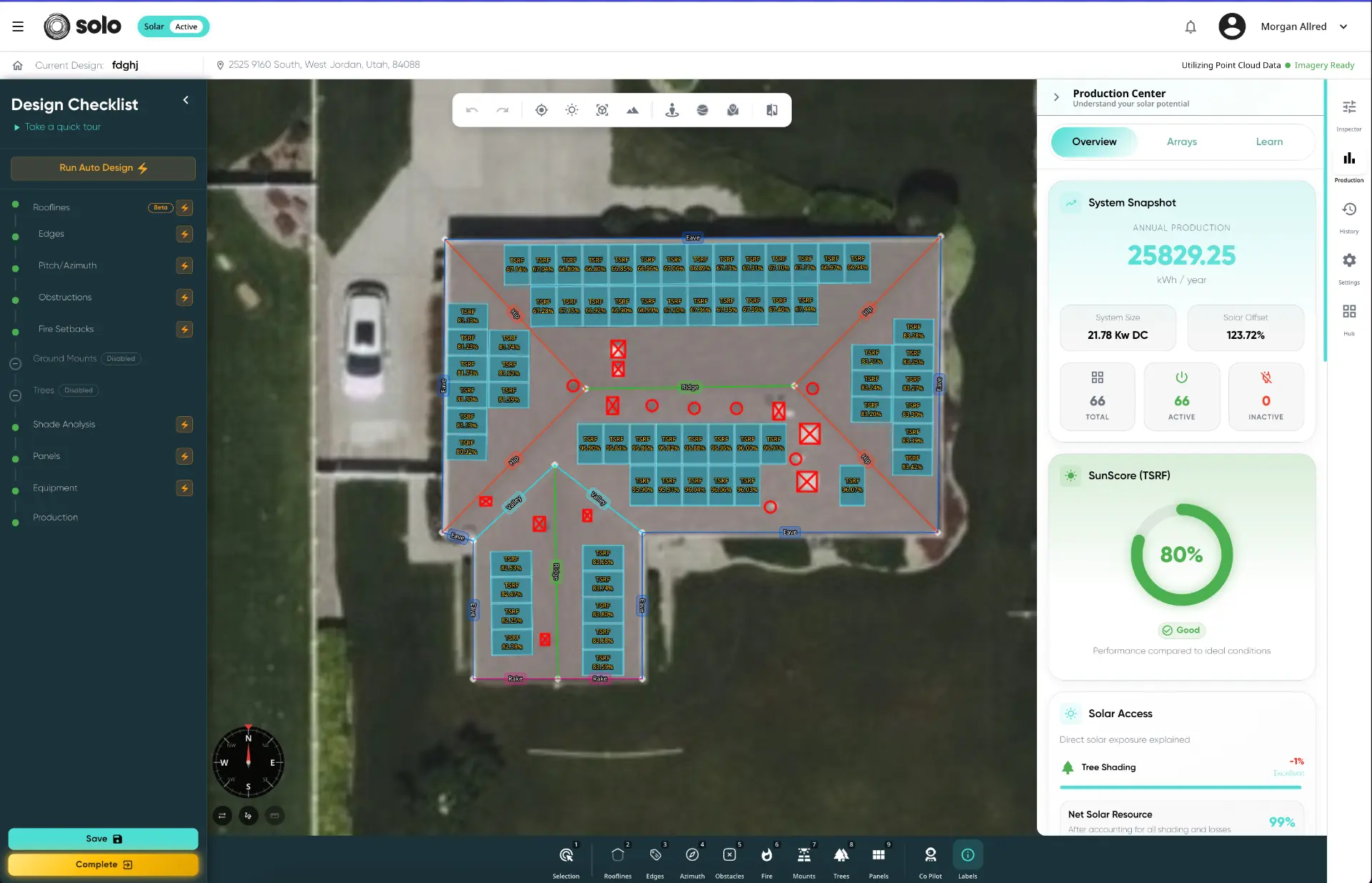
Solo Studio brought previously fragmented design capabilities into a more unified workspace designed for both internal and external users.
The experience combined key parts of the solar design process while simplifying how users interacted with the complexity underneath it. Rather than requiring every user to understand solar-design terminology, data sources, system rules, and internal processes, we looked for opportunities to automate decisions, provide guidance, simplify inputs, and progressively surface information when it was needed.
The result was an experience intended to collect the information necessary for a quality design without requiring every person using it to become a solar-design expert.
Key Decisions
01 · Design for experts and non-experts — Studio needed to support experienced internal users without requiring external users to have the same level of solar-design knowledge.
02 · Hide complexity without losing necessary information — We separated what the system needed to know from what the user needed to understand, automating or simplifying complexity wherever possible.
03 · Design the workflow, not individual features — Imagery, design tools, shade analysis, permissions, and downstream processes affected one another, so decisions had to work across the entire experience.
Working Across Teams
Solo Studio touched nearly every part of the design process, so decisions rarely affected just one team. I worked closely with engineering, operations, leadership, and the people using the product every day to understand requirements, surface dependencies, and work through tradeoffs.
Because we didn't have a dedicated UX designer, I also translated much of that feedback directly into workflows and interface designs. That meant moving constantly between what users needed, what the business needed, and what our small engineering team could realistically build.
Implementation
With a four-person team and an aggressive timeline, we couldn't build everything at once. I broke the larger vision into smaller, sequenced pieces and worked with engineering to prioritize the functionality required to make the end-to-end experience work.
We stayed close to users throughout implementation, testing assumptions and adjusting workflows as the product took shape. The goal wasn't simply to ship a redesigned interface—it was to make sure the new experience could actually support real design work from beginning to end.
Results
Solo Studio brought previously fragmented design tools and workflows into a more unified experience, giving users a clearer path through the solar design process. The work contributed to faster design completion, improved workflow efficiency, and greater adoption of the redesigned experience.
- Faster design completion
- 33%
- Improvement in workflow efficiency
- 40%
What I Learned
This project reinforced that simplifying a product doesn't mean removing complexity—it means deciding how much of that complexity the user should have to carry.
I also learned how much can be accomplished with a small team when the problem is understood clearly and priorities stay focused. Working without dedicated UX support pushed me beyond my traditional product responsibilities and made me more thoughtful about how workflows, information, and user behavior come together.
Most importantly, it reinforced something that has shaped how I work ever since: the best solution isn't the one with the most functionality. It's the one people can actually understand and use.